QuikTune
宽度 : 100%
该VTOL 基库纳Lua脚本简化了寻找一个好调子的过程,用于一个多copter的态度控制参数.
脚本缓慢地增加相关收益,直到发现振荡. 29. 然后将收益减少60%,然后转到下一个收益。 一旦所有收益都被调谐完成,用户可以决定保存或丢弃新的收益.
说明:
确定您为调试准备了工具, 设置了这里讨论的参数 :设置用于调整也是为了保证最好的曲调,设置噪音的鼻音过滤,看普通- 最小过滤。您可以在没有这个步骤的情况下运行才能实现 QuickTune 。ac 滚动调整 if the vehicle can't do an initial hover stably. Then setup the filters and retune for best results.
The script attempts to tune all these parameters (in the given order)
- ATC_RAT_RLL_D
- ATC_RAT_RLL_P and ATC_RAT_RLL_I
- ATC_RAT_PIT_D
- ATC_RAT_PIT_P and ATC_RAT_PIT_I
- ATC_RAT_YAW_D
- ATC_RAT_YAW_P and ATC_RAT_YAW_I
The advantage over AutoTune ** is that QuikTune is safer because the vehicle does not need to move or twitch. The disadvantage is that QuikTune cannot find the vehicle's maximum rotational accelerations (e.g. **ATC_ACC_R_MAX, ATC_ACC_P_MAX, ATC_ACC_Y_MAX)
Installing the Script
Set **SCR_ENABLE ** = 1 to enable scripting and then reboot the autopilot
Download VTOL-quicktune.lua to your PC
Copy the script to your autopilot's SD card's APM/scripts directory. If using MP it may be easiest to use the Config, MAVFtp screen
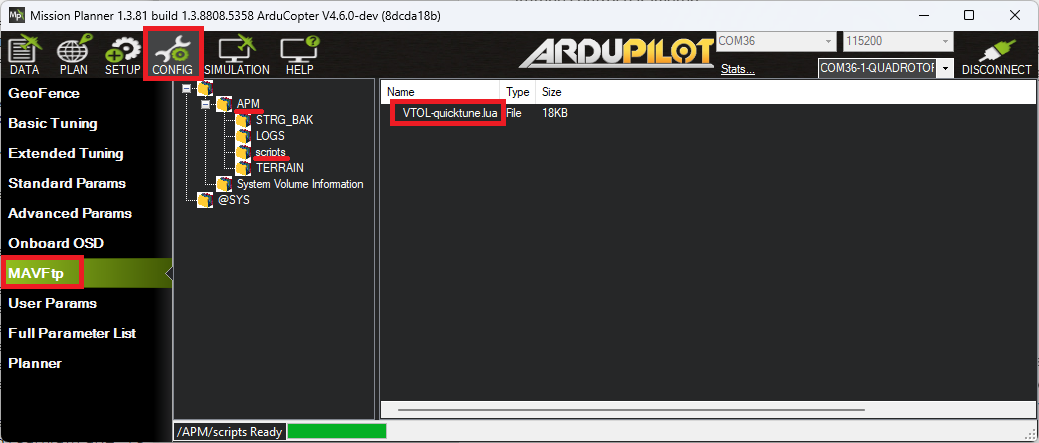
Reboot the autopilot and set QUIK_ENABLE = 1
If an RC switch will be used to start/stop the tune set RCx_OPTION = 300 where "x" is the RC input channel number. Alternatively set one of Mission Planner's Aux Function tab's rows to "Scripting1"
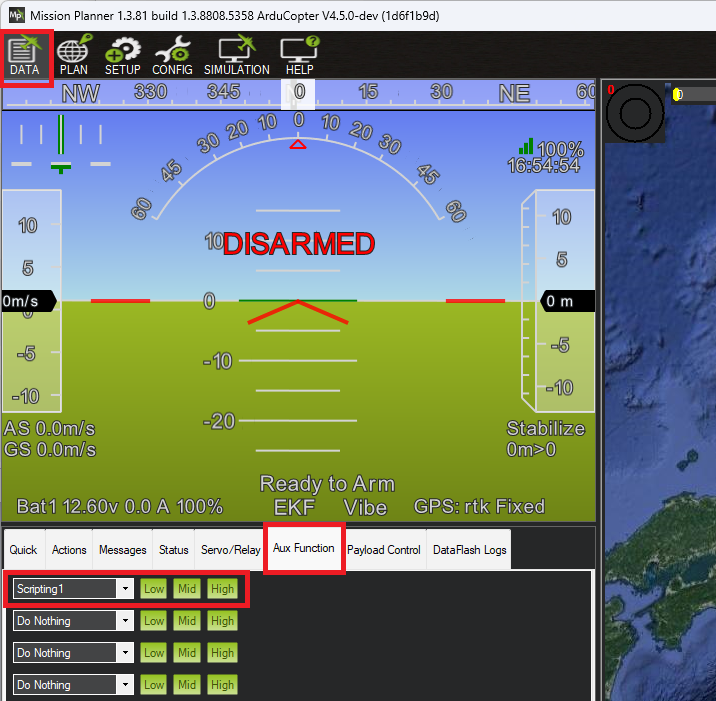


Running QuikTune
- Wait for a calm day and go to an open area with good GPS reception
- Connect with a ground station (e.g Mission Planner or QGC) and ensure that the Messages tab can be seen. This is where output from the tune will appear
- Move the RC switch to the low position OR push MP's Aux Function's "Low" button
- Arm and takeoff in Loiter mode and climb to a height of about 3m
- Begin the tune by moving the RC switch to the middle position OR push MP's Aux Function's "Mid" button
- Monitor the progress of the tune using the GCS's Messages tab
- If necessary reposition the vehicle using the RC transmitter. This will temporarily pause tuning and restore the original gains. Tuning will resume a few seconds after the RC sticks are returned to their center position
- If the vehicle begins oscillating violently cancel the tune by moving the RC switch to the low position OR push MP's Aux Function's "Low" button
- Once the tune has completed accept the new gains by moving the RC aux switch to the high position OR push MP's Aux Function's "High" button
- Land and disarm the vehicle
Advanced Configuration
The full list of available parameter settings are here
【本页后半部分仍为英文原文摘录,补译中。】
译自 ArduPilot Copter「QuikTune」· 查看原文 · CC BY-SA 3.0