传统直升机
直升机专用章节
传统直升机

Copter 支持传统的单转子、 串联转子和 集体 pitch 二次 旋翼直升机包括所有与多相机相同的特性. 多数 设置与多复制机相同,但请在 页面底部或侧边栏,用于直升机特定信息.
演示使用Trex 600型直升机进行的一次现实世界商业飞行 与ArduPilot系统,包括增加RC遥测和FPV。
https://youtu.be/FWTb2-sdNW8 的数目
飞行前与ArduPilot一起飞行 澳大利亚堪培拉队.
https://youtu.be/2xvQvZl8eJc (中文(简体) ).
译自 ArduPilot Copter「Traditional Helicopters」· 查看原文 · CC BY-SA 3.0
双直升机
说明:
Dual Heli Frame需要**传统直升机**作为基地固件. 该手册可从秘书处下载。固件服务器当为固件服务器生成Copter时,它同时生成多旋转器和传统的直升机(向受害者提供-heli后缀)固件.
连接和配置
- 发动机的ESC应连接到自动驾驶8频道输出
- ** 传统的直升机固件在委员会上应装上。
- **FRAME CLASS **至11(赫尔辛基)
- **H DUAL MODE **
类似传统直升机 ** 一个**辅助开关 ** 应设置为"Motor Interlock"以开启/关闭发动机. 通常这里是8频道,所以可以设置**RC8 OPTION改为32。
说明:
见traditional-helicopter-swashplate-setup for basic information on how to setup each swashplate using the parameters below.
Tandem (Longitudinal)

This setup assumes that the forward rotor swashplate is controlled by servo output 1, 2, and 3 and the aft rotor swashplate is controlled by servo output 4, 5 and 6.
Parameter Settings:
- H_DUAL_MODE - Set to 0 for the longitudinal configuration
- H_DCP_SCALER - Scales the differential collective output to the rotors for a pitch axis input
- H_DCP_YAW - Feedforward input to yaw axis for pitch axis (DCP) inputs
- H_YAW_SCALER - Scales the differential lateral cyclic based on yaw axis input. This is a positive number for this setup.
- H_COL_MAX- PWM for maximum collective pitch on forward rotor head that corresponds to H_COL_ANG_MAX
- H_COL_MIN - PWM for minimum collective pitch on forward rotor head that corresponds to H_COL_ANG_MIN
- H_SW_TYPE - Swashplate type for forward rotor head
- H_SW_COL_DIR - Swashplate collective direction for forward rotor head
- H_SW_LIN_SVO - Enables linear servo feature for forward rotor head
- H_COL2_MIN - PWM for minimum collective pitch on aft rotor head that corresponds to H_COL_ANG_MIN
- H_COL2_MAX- PWM for maximum collective pitch on aft rotor head that corresponds to H_COL_ANG_MAX
- H_SW2_TYPE - Swashplate type for aft rotor head
- H_SW2_COL_DIR - Swashplate collective direction for aft rotor head
- H_SW2_LIN_SVO - Enables linear servo feature for aft rotor head
- H_DCP_TRIM - Removes pitch I term bias due to center of gravity offsets or discrepancies between rotors in swashplate setup. If pitch axis has I term bias while hovering in calm winds, use value of bias in DCP_TRIM to re-center I term.
These are only needed for the forward swashplate if H_SW_TYPE is set to H3 Generic.
- H_SW_H3_ENABLE - Do Not Set Manually! This is set automatically once H_SW_TYPE is set to H3 Generic
- H_SW_H3_SV1_POS
- H_SW_H3_SV2_POS
- H_SW_H3_SV3_POS
H_SW_H3_PHANG
These are only needed for the aft swashplate if H_SW2_TYPE is set to H3 Generic.
- H_SW2_H3_ENABLE - Do Not Set Manually! This is set automatically once H_SW2_TYPE is set to H3 Generic
- H_SW2_H3_SV1_POS
- H_SW2_H3_SV2_POS
- H_SW2_H3_SV3_POS
H_SW2_H3_PHANG
This parameter is not used for the longitudinal configuration - H_YAW_REV_EXPO
Side-by-Side (Transverse)

This setup assumes that the left rotor swashplate is controlled by servo output 1, 2, and 3 and the right rotor swashplate is controlled by servo output 4, 5 and 6.
Parameter Settings:
- H_DUAL_MODE - Set to 1 for the transverse configuration
- H_DCP_SCALER - Scales the differential collective output to the rotors for a roll axis input
- H_DCP_YAW - Feedforward input to yaw axis for roll axis (DCP) inputs
- H_YAW_SCALER - Scales the differential longitudinal cyclic based on yaw axis input. This is a positive number for this setup.
- H_COL_MAX- PWM for maximum collective pitch on left rotor head that corresponds to H_COL_ANG_MAX
- H_COL_MIN - PWM for minimum collective pitch on left rotor head that corresponds to H_COL_ANG_MIN
- H_SW_TYPE - Swashplate type for left rotor head
- H_SW_COL_DIR - Swashplate collective direction for left rotor head
- H_SW_LIN_SVO - Enables linear servo feature for left rotor head
- H_COL2_MIN - PWM for minimum collective pitch on right rotor head that corresponds to H_COL_ANG_MIN
- H_COL2_MAX- PWM for maximum collective pitch on right rotor head that corresponds to H_COL_ANG_MAX
- H_SW2_TYPE - Swashplate type for right rotor head
- H_SW2_COL_DIR - Swashplate collective direction for right rotor head
- H_SW2_LIN_SVO - Enables linear servo feature for right rotor head
- H_DCP_TRIM - Removes roll I term bias due to center of gravity offsets or discrepancies between rotors in swashplate setup. If roll axis has I term bias while hovering in calm winds, use value of bias in DCP_TRIM to re-center I term.
These are only needed for the left swashplate if H_SW_TYPE is set to H3 Generic.
- H_SW_H3_ENABLE - Do Not Set Manually! This is set automatically once H_SW_TYPE is set to H3 Generic
- H_SW_H3_SV1_POS
- H_SW_H3_SV2_POS
- H_SW_H3_SV3_POS
H_SW_H3_PHANG
These are only needed for the right swashplate if H_SW2_TYPE is set to H3 Generic.
- H_SW2_H3_ENABLE - Do Not Set Manually! This is set automatically once H_SW2_TYPE is set to H3 Generic
- H_SW2_H3_SV1_POS
- H_SW2_H3_SV2_POS
- H_SW2_H3_SV3_POS
H_SW2_H3_PHANG
This parameter is not used for the longitudinal configuration
- H_YAW_REV_EXPO
Intermeshing

This setup assumes that the left rotor swashplate is controlled by servo output 1, 2, and 3 and the right rotor swashplate is controlled by servo output 4, 5 and 6.
Parameter Settings:
- H_DUAL_MODE - Set to 2 for the intermeshing configuration
- H_DCP_SCALER - Scales the differential collective output to the rotors for a yaw axis input. For a positive value the left rotor would spin counter clockwise to give the proper yaw response.
- H_YAW_SCALER - Scales the differential longitudinal cyclic based on yaw axis input. This is a positive number for this setup.
- H_COL_MAX- PWM for maximum collective pitch on left rotor head that corresponds to H_COL_ANG_MAX
- H_COL_MIN - PWM for minimum collective pitch on left rotor head that corresponds to H_COL_ANG_MIN
- H_SW_TYPE - Swashplate type for left rotor head
- H_SW_COL_DIR - Swashplate collective direction for left rotor head
- H_SW_LIN_SVO - Enables linear servo feature for left rotor head
- H_COL2_MIN - PWM for minimum collective pitch on right rotor head that corresponds to H_COL_ANG_MIN
- H_COL2_MAX- PWM for maximum collective pitch on right rotor head that corresponds to H_COL_ANG_MAX
- H_SW2_TYPE - Swashplate type for right rotor head
- H_SW2_COL_DIR - Swashplate collective direction for right rotor head
- H_SW2_LIN_SVO - Enables linear servo feature for right rotor head
- H_YAW_REV_EXPO - Yaw revereser smoothing exponent, smoothen transition near zero collective region. Increase this parameter to shink smoothing range. Set to -1 to disable reverser.
These are only needed for the left swashplate if H_SW_TYPE is set to H3 Generic.
- H_SW_H3_ENABLE - Do Not Set Manually! This is set automatically once H_SW_TYPE is set to H3 Generic
- H_SW_H3_SV1_POS
- H_SW_H3_SV2_POS
- H_SW_H3_SV3_POS
H_SW_H3_PHANG
These are only needed for the right swashplate if H_SW2_TYPE is set to H3 Generic.
- H_SW2_H3_ENABLE - Do Not Set Manually! This is set automatically once H_SW2_TYPE is set to H3 Generic
- H_SW2_H3_SV1_POS
- H_SW2_H3_SV2_POS
- H_SW2_H3_SV3_POS
H_SW2_H3_PHANG
These parameters are not used for the intermeshing configuration
- H_DCP_YAW
- H_DCP_TRIM
Coaxial

This setup assumes that the counter clockwise rotor swashplate is controlled by servo output 1, 2, and 3 and the clockwise rotor swashplate is controlled by servo output 4, 5 and 6.
Parameter Settings:
- H_DUAL_MODE - Set to 2 for the intermeshing configuration
- H_DCP_SCALER - Scales the differential collective output to the rotors for a yaw axis input.
- H_YAW_SCALER - This parameter is set to zero for the coaxial configuration.
- H_COL_MAX- PWM for maximum collective pitch on counter clockwise rotor head that corresponds to H_COL_ANG_MAX
- H_COL_MIN - PWM for minimum collective pitch on counter clockwise rotor head that corresponds to H_COL_ANG_MIN
- H_SW_TYPE - Swashplate type for counter clockwise rotor head
- H_SW_COL_DIR - Swashplate collective direction for counter clockwise rotor head
- H_SW_LIN_SVO - Enables linear servo feature for counter clockwise rotor head
- H_COL2_MIN - PWM for minimum collective pitch on clockwise rotor head that corresponds to H_COL_ANG_MIN
- H_COL2_MAX- PWM for maximum collective pitch on clockwise rotor head that corresponds to H_COL_ANG_MAX
- H_SW2_TYPE - Swashplate type for clockwise rotor head
- H_SW2_COL_DIR - Swashplate collective direction for clockwise rotor head
- H_SW2_LIN_SVO - Enables linear servo feature for clockwise rotor head
- H_YAW_REV_EXPO - Yaw revereser smoothing exponent, smoothen transition near zero collective region. Increase this parameter to shink smoothing range. Set to -1 to disable reverser.
These are only needed for the counter clockwise swashplate if H_SW_TYPE is set to H3 Generic.
- H_SW_H3_ENABLE - Do Not Set Manually! This is set automatically once H_SW_TYPE is set to H3 Generic
- H_SW_H3_SV1_POS
- H_SW_H3_SV2_POS
- H_SW_H3_SV3_POS
H_SW_H3_PHANG
These are only needed for the clockwise swashplate if H_SW2_TYPE is set to H3 Generic.
- H_SW2_H3_ENABLE - Do Not Set Manually! This is set automatically once H_SW2_TYPE is set to H3 Generic
- H_SW2_H3_SV1_POS
- H_SW2_H3_SV2_POS
- H_SW2_H3_SV3_POS
H_SW2_H3_PHANG
These parameters are not used for the coaxial configuration
- H_DCP_YAW
- H_DCP_TRIM
【本页后半部分仍为英文原文摘录,补译中。】
译自 ArduPilot Copter「Dual Helicopter」· 查看原文 · CC BY-SA 3.0
HeliQuad
宽度 : 100%
ArduPilot支持HeliQuads,也称集体皮奇四面体或可变皮奇多面体.

说明:
海利四号需要一架**传统直升机**作为基地固件. 该手册可从秘书处下载。固件服务器。当 Copter 编译时,它现在既生成传统的直升机,也生成多旋转固件。
这些机体在4个旋转器上每个旋转器上都使用独立控制的集体抛管,单电动机通过带和扭矩管以同样的速度将 Sugare 4个 Ferrari的旋转器全部电动. 它具有高度的有氧性,能够反转飞行,但可受到**高振动水平**。
哪里买?
- WLTOYs Assassin V383可从零售商那里获得,其中包括:WLTOYs.eu (英语).
连接和配置

- 每个伺服器出版物应使用普通多复制机上用于发动机的相同输出进行连接(**,请参见这里的顺序**)
- the motor's ESC should be connected to the autopilot's channel 8 output
- **traditional helicopter firmware ** should be loaded onto the vehicle.
If using the WLToys Assassin V383 a parameter file is available here and can be used to set all parameters immediately. For other builds these are the standard params that should be set:
- **FRAME_CLASS ** to 13 (HeliQuad)
- **FRAME_TYPE ** to 1 ("X" if front right motors spins counter clockwise) or 3 ("H" if front right motor spins clockwise)
Similar to a traditional helicopter ** an **auxiliary switch ** should be set to "Motor Interlock" to turn on/off the motor. Normally this is channel 8 so you could set **RC8_OPTION to 32.
Videos
Inverted flight test
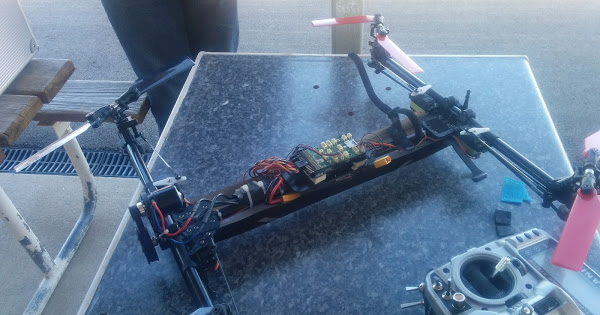
Picture of CanberraUAV vehicle
【本页后半部分仍为英文原文摘录,补译中。】
译自 ArduPilot Copter「HeliQuads (Variable Pitch Multicopters)」· 查看原文 · CC BY-SA 3.0
直升机配置 / Ground School
搭载飞行控制器
https://youtu.be/sJEO4CUhwjs (中文(简体) ).
连接Servos和传送器设置
https://youtu.be/ JagHOC0 mNQ (中文(简体) ).
洗牌设置和级别
https://yotu.be/oA-9FFYC6Ek (中文(简体) ).
组合键和稳定曲线设置
https://youtu.be/qfOuZc 7J4g (英语).
电动直升机的喉咙设置
https://youtu.be/PPGnhMssyV8 (英语).
螺旋曲线、活塞和涡轮发动机
https://youtu.be/C3E2f8h1CoM (中文(简体) ).
【本页后半部分仍为英文原文摘录,补译中。】
译自 ArduPilot Copter「Traditional Helicopter – ArduPilot Helicopter Ground School」· 查看原文 · CC BY-SA 3.0
直升机首飞与调参
【本页后半部分仍为英文原文摘录,补译中。】
译自 ArduPilot Copter「Traditional Helicopter First Flights」· 查看原文 · CC BY-SA 3.0
直升机首次设置
首次设置自动驾驶包括下载和安装地面站(GCS), 将自动驾驶器安装到帧上, 连接到接收器 电源和电动机 然后进行初步配置和校准。
关于每项任务的更多信息(按自动驾驶方式排序) (见本节)
初始设置后, 请注意遵守指令 。传统直升机首次飞行
【本页后半部分仍为英文原文摘录,补译中。】
译自 ArduPilot Copter「Traditional Helicopter Setup」· 查看原文 · CC BY-SA 3.0
直升机提示
- 一定要遵守维基指令,一步一步!
- 确保CG与主转轴一致
- 刀片跟踪必须在四分之一刀片厚度内,或更好地避免过度振动
- 震动是直升机自动驾驶的敌人!
- 内部燃烧引擎和涡轮可以产生VIBE日志中不出现的的联系高频振动,并且可以化执行其低频,从而影响EKF和姿态控制(见下文地面测试来检查这一点). 电动直升机也经常出现这种情况。
- 自动驾驶器应当隔离良好的振动. 建议使用自动驾驶装置,安装内部的IMU振动坝盖和减少振动装置。
- 传统直升机这是能够逆向飞行并使用完全负集体范围。
检查高频振动
在这方面的高ء频率振动是指接近IMU采样频率的振动,或其倍数,这些振带来的好处会与姿态总的说来器的控制输入量同名化. 高频振动的症状可能是,尽管飞行员正在以 你干嘛稳定的方式指挥水平飞行,但姿态估计会变得不正确,使其显著倾斜. 在极端,它可以导致电子安全 or even a crash. Excessive vibration can also make altitude hold imprecise or even produce uncontrollable climbs/descents.
One method of testing this, is to secure the helicopter to the ground, and run up the main rotor, watching the artificial horizon in the ground control station. If it moves away from level, you probably have a vibration issue which needs to be addressed. Testing should be done at various collective levels and rotor speeds. Be careful not to over-stress the helicopter with collective extremes.
Setup for ground test:
- Secure vehicle to the ground.
- Temporarily reduce Roll, Pitch, and Yaw P,I,and D, PIDs to zero. Be sure to restore them after this test!
- Set ACRO_OPTIONS = 2, temporarily, if not being used already.
- Change to ACRO mode.
- Arm and engage motor interlock, allowing the vehicle to spool up at 0 degree pitch, watching for any change from level in the GSC of the artificial horizon. Any significant tilt indicates noise is disrupting the attitude estimate and should be investigated and eliminated.
- Change the target main rotor speed a bit above and below the nominal target using the H_RSC_SETPOINT (or TX throttle curve if using Passthru mode) and repeat.
- Re-check the blade tracking also while doing this test.
Be sure to also eliminate the possibility of lower frequency vibrations from the main or tail rotors causing the issue. Unlike vibrations near the sampling rate and its harmonics, which cannot be eliminated by software filtering, rotor vibrations can be improved using ArduPilot's notch filtering feature. See common-measuring-vibration and Helicopter Dynamic Notch Filter Setup.
Possible False Landing Detections
Under extreme circumstances (flying in extremely turbulent conditions, for example), it is possible for the firmware, to falsely detect a landing condition, although still flying. This can lead to lack of control in position control modes and even possible disarming. An RC Auxiliary Function ("159") is provided to allow an RC to enable (needed when actually landing) or disable (to prevent false detects during missions) the landing detection algorithm under pilot control.
【本页后半部分仍为英文原文摘录,补译中。】
译自 ArduPilot Copter「Traditional Helicopter Tips」· 查看原文 · CC BY-SA 3.0